Web App vs Mobile App: How to Decide What Your Business Needs
Madeleine EvansDigital Marketing Consultant
Updated 10 min read
With mobile devices accounting for 59.9% of global traffic compared to 38.51% for desktop, it's very clear how people access online services matters. If you’re a business with an idea for an app, then you’ve probably come across two terms: mobile app and web app.
Both serve users online, but they are widely different in terms of build, performance, features, and accessibility. So, what is the difference between a web app vs mobile app, and how do you know which is right for your business?
This is something many clients have asked us over the years. The short answer? It all depends on what you want your app to achieve, who will use it and how they interact with it too.
In his article, we’ll break down the key differences between mobile apps and web apps, including the pros and cons of each to help you make the best decision.
What is a Web App?
A web app is software that users access through an internet browser. Unlike a website that simply displays static content, a web application allows users to interact with features, sign in, manage information and perform tasks in real time.
It’s built with web technologies such as HTML, CSS, JavaScript, and server-side languages like Python or Node.js. This means it can work across a number of different devices without users needing to download and install anything.
Some examples include online booking systems, word processors (Google Docs), customer portals, project management platforms (e.g., Trello) and eCommerce applications.
How Does a Web App Work?
As mentioned, web apps run through a browser, such as Chrome, Safari, or Edge. When someone accesses the application, their browser communicates with a remote server, which processes requests, retrieves information from databases and delivers the appropriate content.
Most web applications have three main components:
- Front end: The interface users see and interact with.
- Back end: The server-side functionality that processes requests and manages application logic.
- Database: Where information is stored, organised and retrieved.
Types of Web Apps
There are several types of web apps, depending on their functionality and complexity:
- Static web apps: Display largely fixed information with limited interaction.
- Dynamic web apps: Generate content based on user activity, data and other inputs.
- Single-page applications (SPAs): Update content dynamically without repeatedly reloading entire pages.
- Progressive web apps (PWAs): Offer app-like experiences through a browser, with features such as installation and some offline functionality.
Pros and Cons of a Web App
Advantages of Web Apps:
- Offer cross-platform compatibility with an internet connection and browser.
- No app store download or installation required.
- Updates can be deployed centrally, making maintenance easier.
- Often more cost-effective to develop and maintain than separate native mobile apps.
- Easy to integrate with websites, databases and business systems.
Disadvantages of Web Apps:
- Typically rely on an internet connection for full functionality.
- Access to certain device features can be limited.
- Performance may vary depending on the browser and device.
- Less control over app store visibility and distribution.
What is a Mobile App?
In contrast, a mobile app is software that runs on wireless devices only such as smartphones and tablets. That is the biggest difference between the two. Users can download it from an app marketplace like Apple App Store or Google Play Store.
Data from YouGov reported that most adults in Britain downloaded between 10 and 30 apps back in 2025. Now, that’s a lot of apps! But, it shows how familiar people are with using them in their everyday lives.
Notable examples of mobile apps include social platforms like Instagram and TikTok, and delivery services (e.g. Amazon and Deliveroo).
How Does a Mobile App Work?
Mobile apps are installed directly onto a device, and can store certain information locally, communicate with remote servers and access device functionalities, including cameras, GPS, biometric authentication and push notifications. Because of this, they are able to deliver a faster, smoother and more responsive user experience.
Types of Mobile Apps
There are three main approaches to mobile app development:
Native apps: Built specifically for mobile using platform-specific technologies like Swift and Objective-C for iOS, or Kotlin and Java for Android. They generally provide the strongest performance.
Cross-platform apps: Developed using frameworks that let businesses share much of their code across iOS and Android, reducing duplication.
Hybrid apps: Combine web technologies with a native application wrapper, allowing web-based functionality to run within an installed app.
The right mobile app depends on your technical requirements, budget and intended user experience.
Pros and Cons of a Mobile App
Advantages of Mobile Apps:
- Direct access to device features, including GPS, cameras and biometrics.
- Push notifications can encourage repeat engagement from customers.
- Can support offline connectivity where appropriately designed.
- Allows brands to offer a richer, personalised experience for users.
- Can deliver strong performance, particularly with native development.
Disadvantages of Mobile Apps:
- Users must download and install the application.
- Separate platform requirements can increase development costs.
- App store approval processes can affect releases.
- Ongoing maintenance is needed to support updates and different devices.
- Getting users to download and regularly use the app requires a clear value proposition.
Web App vs Mobile App: Key Differences
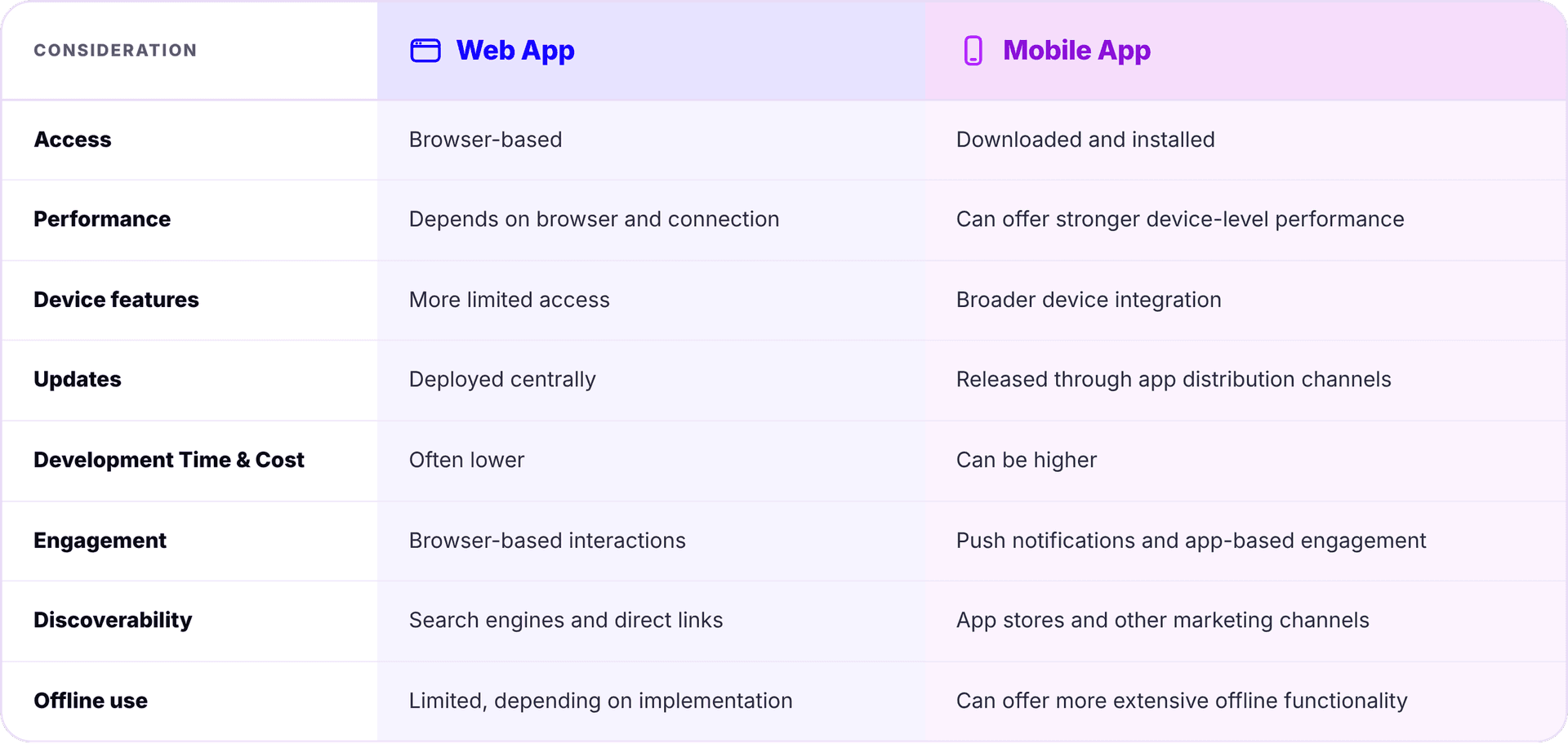
Now, let’s take a closer look at the key differences between mobile apps and web apps.
Access
Web apps can be instantly accessed via a browser on almost any compatible device, regardless of the operating system. Users can simply visit a URL on their laptop or smartphone, making them convenient for customers who don't want to download additional software.
Mobile apps require installation, which creates an extra step but provides a dedicated space on the user's homescreen. Banking apps like Monzo are a good example of this. Customers have the ability to access their accounts and manage payments through a dedicated mobile interface.
Performance
Web apps rely on browsers to process and display information with many operations resting on the connection between the user's device and a remote server. Performance can therefore be influenced by internet speed, browser capabilities, and how well developed the application is.
On the other hand, mobile apps can often deliver faster performance because they are installed directly onto a device. They can make use of its processing power and local storage to load content more quickly and support resource-intensive features such as real-time GPS tracking and image processing.
Device Features
Subject to browser compatibility, web apps support access to certain device features, such as geolocation, bluetooth, and mouse track touch/pointer events. For instance, an online booking system like Calendly uses browser-based camera and microphone access to facilitate virtual meetings.
Meanwhile, mobile apps offer more extensive access to device-specific features. Our work with DKC is a stellar example. By combining mobile functionality with AI technology and secure backend infrastructure, we created a connected platform that simplifies pedigree registration, ownership transfers and breeder management.
Updates
With a web app, updates are generally deployed directly to the server, meaning users automatically access the latest version of the application when they next load or refresh it. So, if you introduce a new feature or fix an issue, changes can be rolled out immediately.
Mobile app updates are distributed through app stores or other supported release methods. While some updates can be installed naturally, users may need to download a new version to access the latest features or improvements. Businesses also need to consider app store review processes and compatibility with different operating system versions.
Development Time and Cost
In most cases, web apps are more cost-effective to develop because they only use a single codebase to serve users across different devices, screen sizes, and operating systems. What’s more, you can test your idea and gather feedback quickly, helping you refine functionality and UX.
A bespoke mobile app requires more investment, costing anywhere between £15,000 and £150,000+ in the UK. Each platform (iOS and Android) has its own requirements, testing processes and maintenance. However, cross-platform frameworks such as React Native and Flutter allow developers to share much of the code between platforms, potentially reducing development time and costs.
User Engagement
If your focus is to encourage regular interaction, then user engagement should be a key consideration. Mobile apps have an advantage here because they can send push notifications to customers about updates, abandoned baskets, exclusive offers or loyalty rewards.
Web apps still provide engaging, personalised experiences through customer dashboards, account notifications and tailored recommendations. However, web applications rely on users actively returning through a browser, email links, or other digital marketing channels.
Discoverability
Web apps can benefit from search engine and AI search visibility, provided they are accessible to these platforms. For example, a corporate training provider could use SEO-optimised content to attract potential customers and direct them to an online booking app to register for courses.
Mobile apps are usually discovered through app stores, referrals, and social media. App Store Optimisation (ASO) can improve visibility within app marketplaces, but users will still need to download the application beforehand.
Offline Use
Finally, decide whether your application needs to work without an internet connection. Traditional web apps work via an active internet connection to retrieve information and process requests. However, Progressive Web Apps can use service workers and cached data to make selected content and functionality available offline.
The advantage of mobile apps is that they can work offline by storing information directly on the device. Users can view saved documents, access previously downloaded information or complete certain tasks before synchronising their data with a central server once they're back online.
Should I Build a Web App or Mobile App?
There isn't a one-size-fits-all answer to the web app vs mobile app question. Ultimately, the right choice depends on your business model, users, and goals.
Here are some considerations to help you decide.
Choose a web app if:
- You want to provide customers or employees with browser-based access.
- Your application needs to work across multiple devices.
- You want to simplify deployment and ongoing maintenance.
- Your requirements centre around data management, booking systems or customer portals.
- Search engine visibility and easy access are important.
Choose a mobile app if:
- Your customers will use the application regularly.
- You need features such as GPS, camera access or biometric authentication.
- Push notifications are important to your engagement strategy.
- Your application needs substantial offline functionality.
- You want to deliver a dedicated mobile experience.
For some businesses, you may actually need both types of applications, especially for ones who benefit from a web-based management platform alongside a dedicated mobile app for customers or employees.
It's also important to look beyond the initial build, as hosting, security, updates, integrations and maintenance all contribute to the overall investment, regardless of which approach you choose.
Got an Idea for an App?
Then you need an experienced digital partner to understand your business, your users and the challenges you're looking to solve.
Our dedicated teams across Android, iOS and hybrid mobile app development deliver innovation, style and stability in one neat, tidy package. From initial planning and UX design through to development, integrations and ongoing support, we’ll help turn your idea into something workable, scalable, and most importantly, a joy to use.
If you're considering mobile app development in Manchester, or want to know if a web app would better support your objectives, talk to Pixel on 01618502210 or send a message to hello@builtbypixel.com.